Catering Quote Builder
Coming soon

Catering quotes that add up.

For small catering companies and private chefsAndroid

Enter the event, build the menu, add staff and transport. Catering Quote Builder turns your costs into a price with markup, discount and VAT, shows what you will earn, and makes the PDF quote for your client.

Coming soon to Google Play

Not on Google Play yet. This becomes the download link on release day.

  • No account
  • No ads
  • Works offline
  • Free

A quote from the app

Catering quote

Q-2026-006
Issued 08.10.2026
Valid until 22.10.2026

Event
Tamm & Kask wedding · Wedding
Date
Saturday 21 November 2026
Time
16:00–00:00 (8 h of service)
Venue
Vihula Manor, Lääne-Viru
Guests
86
Menu
€3,801.63
Extras
€2,004.12
Subtotal excl. VAT
€5,805.75
Discount 5%
−€290.29
Total excl. VAT
€5,515.46
VAT 24% on €5,515.46
€1,323.71
Total incl. VAT
€6,839.17

€79.53 per guest incl. VAT, based on 86 guests

What you keep · not printed on the client's quote

Total cost
€3,906.10
Expected profit
€1,609.36

29.2% margin · €18.71 per guest

The sample wedding from the app's screenshots. Names and figures are fictional demo data.

How it works

Cost it, price it, send it.

One event, three steps, six screens. The captures below are from the app itself, showing the same sample wedding for 86 guests.

Cost it

Start with what the event costs you. Dishes are counted per portion, everything around the food has its own place, and each kind of cost is totalled separately.

  1. Cost per portion, portions needed01

    Starters, mains, desserts and drinks. Each dish has an ingredient cost and a preparation cost per portion, and is served per guest or as a fixed number of portions. Beef cheek at 0.6 per guest comes to 52 portions for 86 guests.

  2. Staff, transport, tableware02

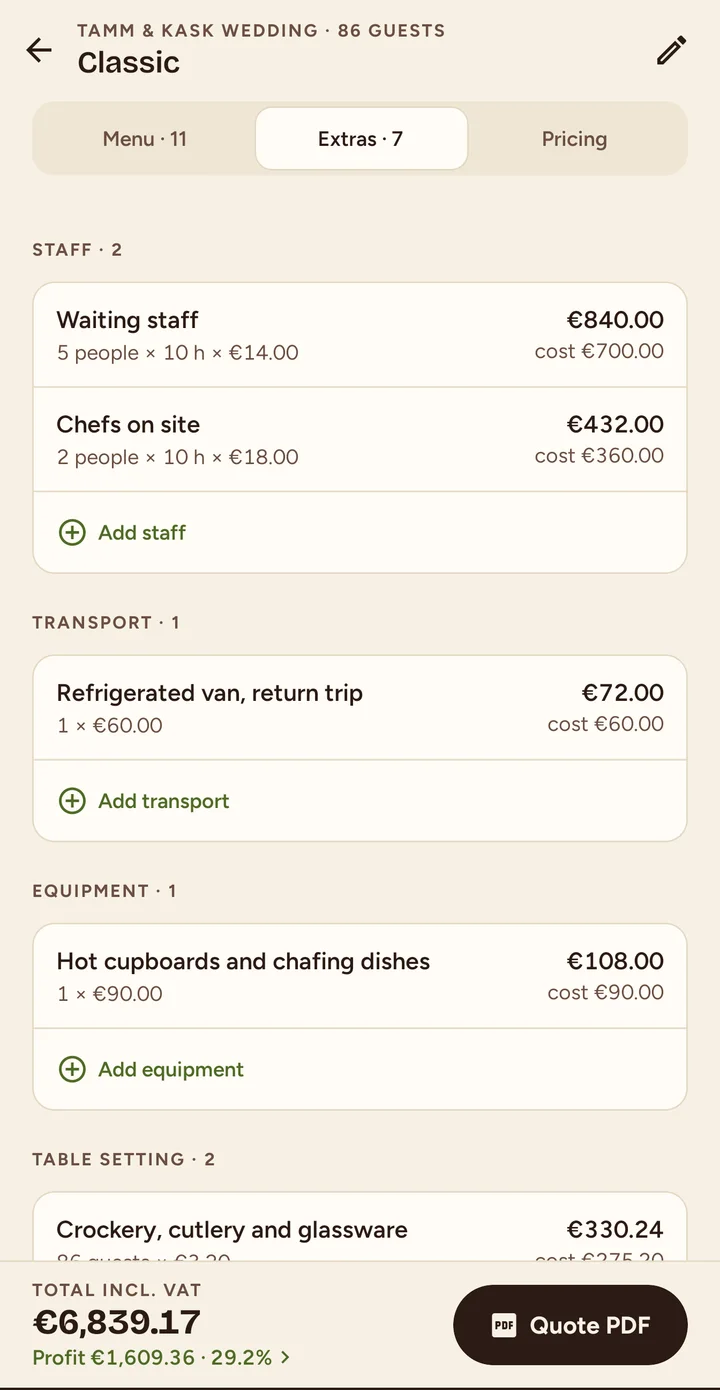
    Staff, transport, equipment, table setting, packaging and other costs, counted as a fixed quantity, per guest or per hour. Hourly staff can follow the service duration plus set-up: 8 h of service and 2 h of set-up make 5 people × 10 h × €14.00.
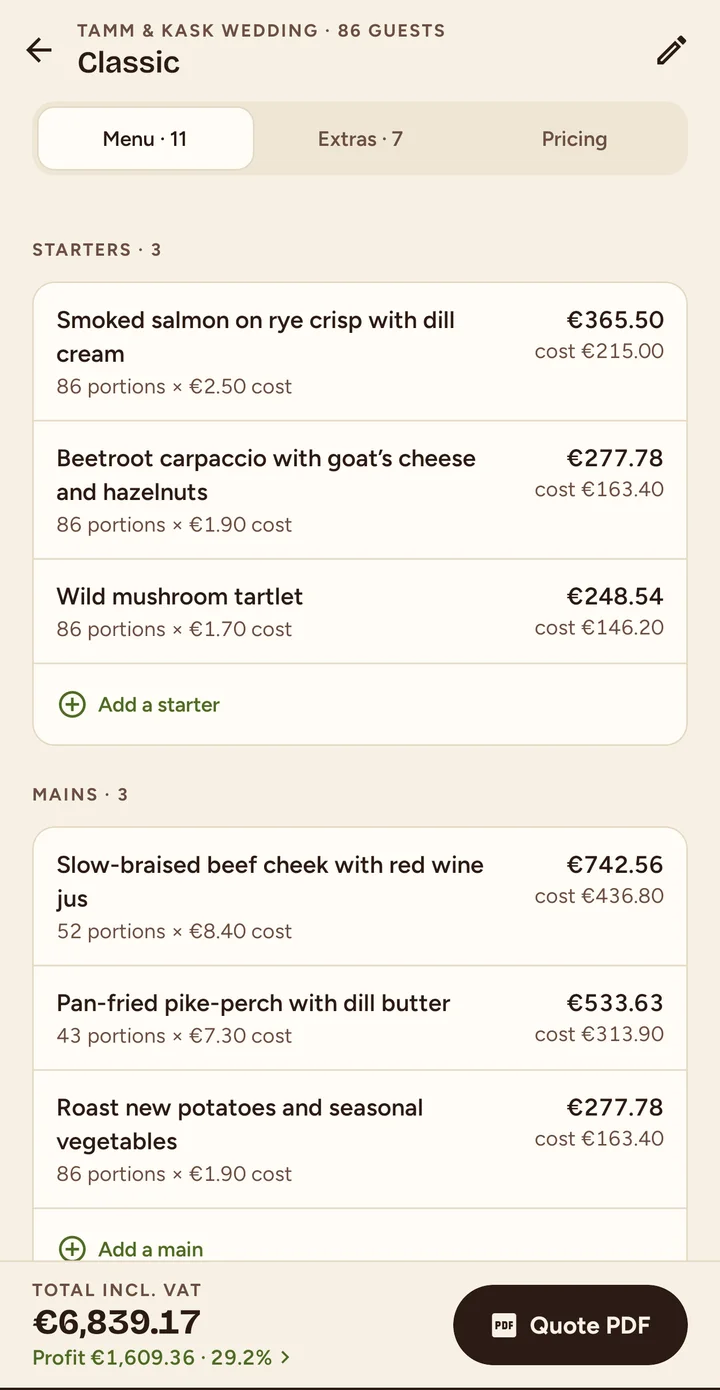
Menu01
The menu tab of the wedding quote for 86 guests: three starters and three mains, each with portions, cost per portion, line price and line cost, and the total of €6,839.17 at the bottom.
Extras02
The extras tab: waiting staff as 5 people × 10 h × €14.00, chefs on site, a refrigerated van and equipment hire, each with its price and cost.

Price it

Then decide what to charge. The app works out the price from your costs, takes the discount off before VAT and tells you what is left for you.

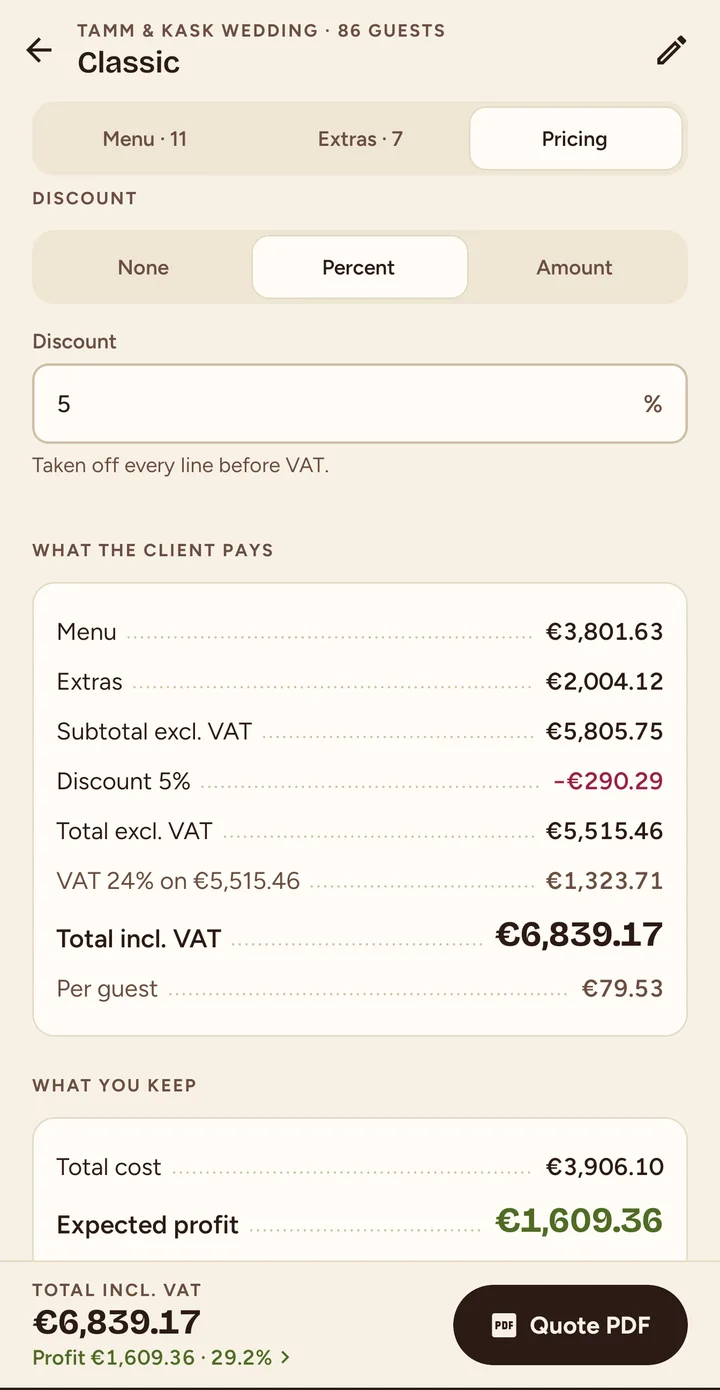
  1. Markup, discount and VAT03

    Work with a markup on cost or a margin on price, set separately for the menu and for extras; the app shows what one means in terms of the other. Add a discount as a percentage or an amount. Use one VAT rate or several on the same quote, or switch VAT off.

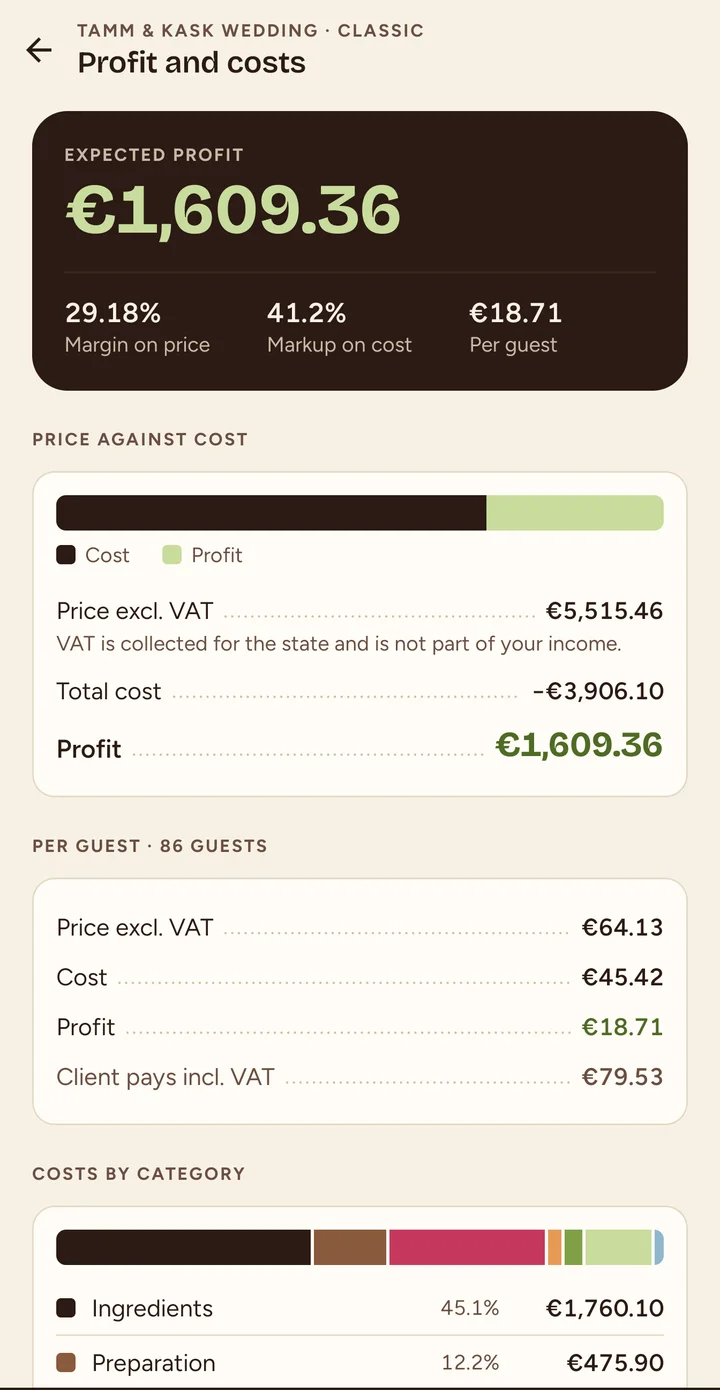
  2. What you will earn04

    Expected profit, margin on price, markup on cost and profit per guest. Further down: costs by category, your five largest costs and the largest discount you could give without a loss, 32.7% in this sample.

Pricing03
The pricing tab: a 5% discount and the summary of what the client pays, from menu €3,801.63 and extras €2,004.12 to the total including VAT of €6,839.17, €79.53 per guest.
Profit04
The profit screen: expected profit €1,609.36, margin on price 29.18%, markup on cost 41.2%, €18.71 per guest, and a bar comparing price and cost.

Send it

Hand the client a document they can read, and keep an eye on the answer. Print it or share it from your phone through any app you already use.

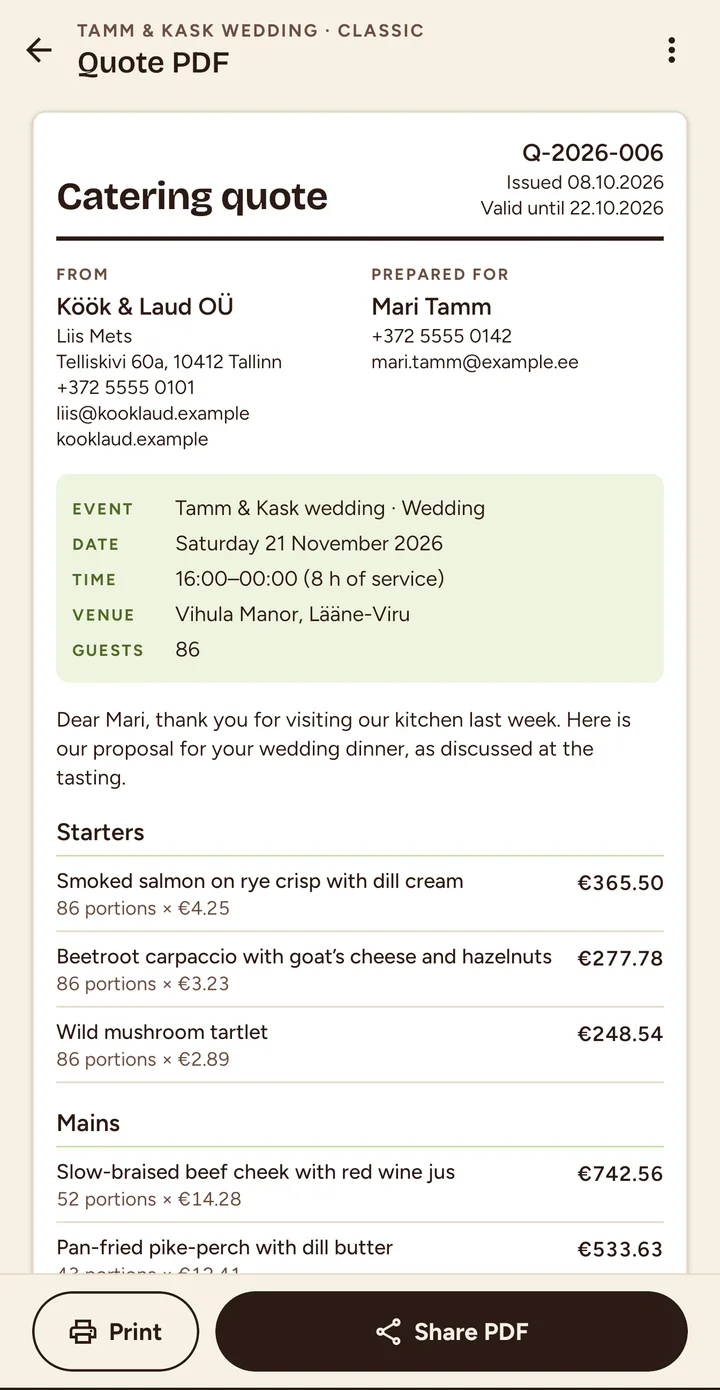
  1. Services, prices and terms05

    Every dish and service with quantities and prices, the discount, VAT per rate, the total, the price per guest and your terms of service. If you would rather not show line prices, send the version with one price per guest.

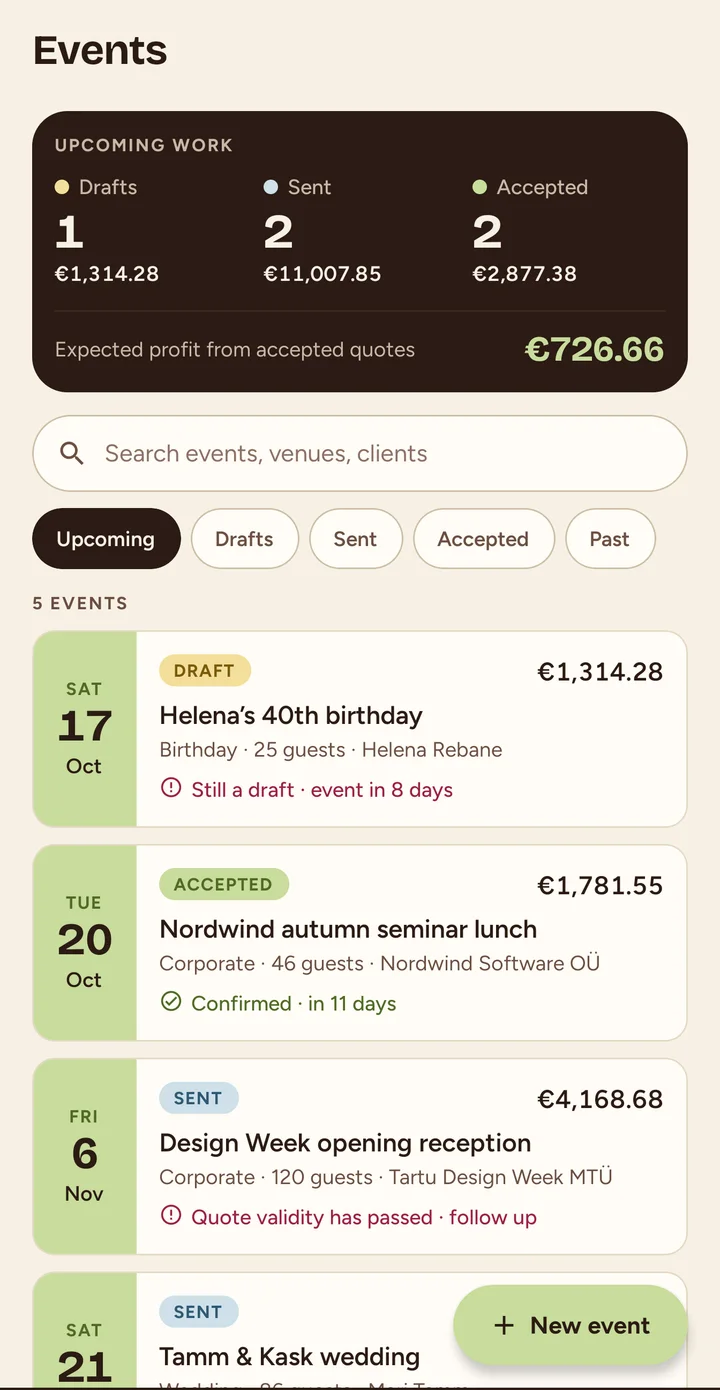
  2. Every enquiry in one list06

    Mark quotes as draft, sent, accepted or declined. The first screen shows upcoming work with its value, the expected profit from accepted quotes, and one line per event that needs attention, such as “Still a draft · event in 8 days”.

Quote PDF05
The quote preview: a document headed Catering quote with number Q-2026-006, issue and validity dates, sender and client, the event details and the first priced menu lines, with Print and Share PDF buttons.
Events06
The Events screen: upcoming work with one draft, two sent and two accepted quotes, expected profit of €726.66 from accepted quotes, a search field, filters and event cards with date, status and total.

The maths

Six steps, every time.

Every figure in a quote follows the same six steps. Money is counted in whole cents all the way, so the lines always add up to the total. The app has the same explanation on its “How the maths works” screen.

  1. Portions and quantities

    A dish is served per guest or as a fixed number of portions. Per guest means guests × portions per guest, rounded up. An extra cost is a fixed quantity, per guest, or people × hours × hourly rate.

    25 guests × 1.5 per guest
    37.5
    Rounded up
    38 portions
  2. Cost

    Cost per portion is ingredients plus preparation. Line cost is the unit cost times the quantity. Ingredients, preparation and each kind of extra cost are totalled separately.

    Smoked salmon on rye crisp, per portion
    €2.50
    86 portions × €2.50
    €215.00
  3. Markup or margin

    Two ways to add your profit, and they are not the same thing. Markup: price = cost × (1 + %). Margin: price = cost ÷ (1 − %). The unit price is rounded to the cent first and then multiplied by the quantity. A price set by hand replaces the calculation for that line.

    Cost
    €10.00
    50% markup (on cost)
    €15.00
    50% margin (on price)
    €20.00
  4. Discount

    A discount comes off the net prices, before VAT. It is shared between all lines in proportion to their price, cent by cent, so the reduced lines still add up. A fixed amount can instead be an amount off the total including VAT, “€100 less to pay”: the app then lowers each VAT rate's share and works the VAT back from the reduced total.

    Subtotal excl. VAT
    €5,805.75
    Discount 5%
    −€290.29
    Total excl. VAT
    €5,515.46
  5. VAT

    Each line has a VAT rate. VAT is calculated once per rate on the discounted net sum of that rate, not line by line, and rounded to the cent. The total is the net plus the VAT of every rate. If your business does not charge VAT, switch it off: quotes then show a single total.

    VAT 24% on €5,515.46
    €1,323.71
    Total incl. VAT
    €6,839.17
  6. Profit

    Profit is the net price after discount minus all costs. VAT is never part of it. Margin is profit as a share of the net price; markup is profit as a share of the cost.

    Total excl. VAT
    €5,515.46
    Total cost
    −€3,906.10
    Profit
    €1,609.36
    Margin on price
    29.18%
    Markup on cost
    41.2%

Also on the card

The rest of the quote book.

  • Variantscompared

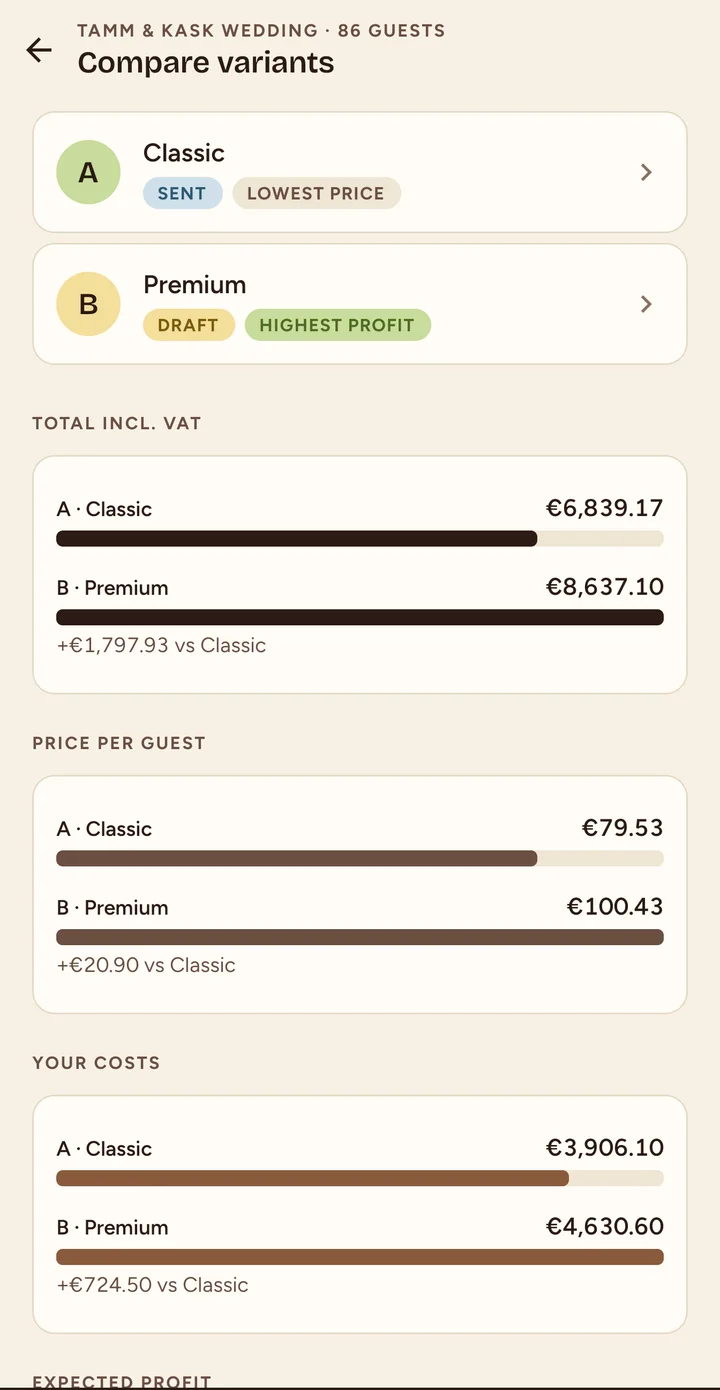
    Two or three versions of the same event, side by side: total, price per guest, costs and profit, with the difference to the first. In the sample, Premium is €8,637.10, which is €1,797.93 more than Classic.

  • Historykept

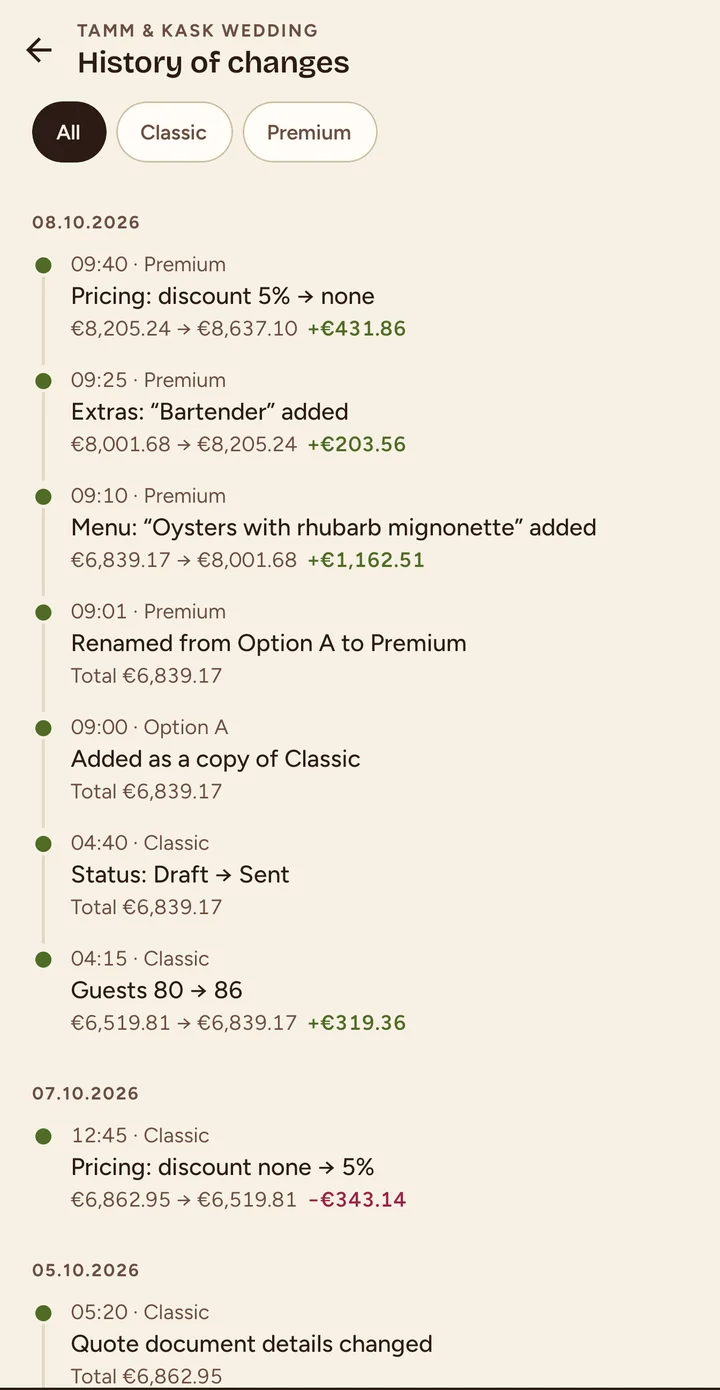
    Every change to a quote with the total before and after. Guests 80 → 86 moved the sample from €6,519.81 to €6,839.17.

  • Templatesfour included

    A wedding dinner, a corporate lunch buffet, a birthday garden party and a private dinner at home. Save your own quotes as templates too.

  • My dishes26 to start

    A library of dishes with their costs and usual portions per guest. Edit the starter set and add what you actually cook.

  • Clientson file

    Name, company, phone, e-mail, address and notes, with each client's events and the value of their accepted quotes.

  • Backupone file

    Save a backup file whenever you like and restore from it later. Nothing is uploaded for you.

Compare variants
The compare screen: Classic at €6,839.17 and Premium at €8,637.10 with bars for the total, the price per guest and the costs.
History of changes
The history screen: dated entries such as “Guests 80 → 86” with the total before and after each change.

Made for one person and one phone

  • Small catering companies

    Price an enquiry the same day instead of rebuilding the spreadsheet.

  • Private chefs

    Offer a classic and a premium menu and see what each one earns.

  • Home bakers doing events

    Count the boxes, the delivery and your hours, not just the ingredients.

Privacy

Your clients stay on your phone.

The names, phone numbers and e-mail addresses you enter belong to your customers. The app keeps them where you typed them.

Read the privacy policy

  1. Everything stays on the device

    Events, prices, clients and your business details are stored only in the app's own storage on your phone.

  2. No internet permission

    The app cannot open a network connection, so it cannot send your data anywhere. It works fully offline.

  3. No account, no tracking, no ads

    No sign-up, no analytics, no advertising, no notifications, no in-app purchases.

  4. You decide what leaves the phone

    A quote PDF or a backup file is handed to Android's share sheet only when you tap Share. Where it goes next is your choice.

Questions

Before you install

Something else? [email protected]

What is the difference between markup and margin?

Markup is profit as a share of your cost; margin is profit as a share of the price. A dish that costs €10.00 sells for €15.00 at a 50% markup and for €20.00 at a 50% margin. You choose one way of working; the app shows the equivalent in the other and converts the percentages when you switch, so your prices stay put.

How is a discount applied?

Off the net prices, before VAT. A percentage or a net amount is shared between all lines in proportion to their price, so the discounted lines still add up exactly. You can also enter an amount off the total including VAT: the client then pays exactly that much less and the VAT is worked back from the reduced total. A discount can never be larger than the quote.

How does VAT work in the app?

Each dish and each extra cost has a VAT rate, so one quote can carry several rates. VAT is calculated once per rate on the discounted net sum and rounded to the cent. The rate list starts with 24%, 13%, 9% and 0% and is yours to edit. If you are not registered for VAT, switch it off and the quote shows a single total.

Does it need an internet connection?

No. The app has no permission to use the internet and works offline. Sharing a PDF uses whichever app you pick from Android's share sheet.

What happens to my data if I change phones?

Your data is only on your phone and is not part of Android's cloud backup. Before you switch, save a backup file in More → Backup and restore, move the file to the new phone and restore from it there. Uninstalling the app removes its data.

Is it free?

Yes. There are no ads, no in-app purchases and no subscription.

Can I use the figures for my accounts or my VAT return?

No. The app is a calculator for preparing quotes. The results depend on the costs, percentages and VAT rates you enter and are your own estimates, not accounting or tax advice.

Which currency and formats does it use?

Euros, written as €12.50, dates as 20.10.2026 and times in the 24-hour clock. The app is in English.

Price your next enquiry tonight.

Start from one of the four templates, change the guest count and see the total and your profit.

Coming soon to Google Play

Not on Google Play yet. This becomes the download link on release day.